
You are using an out of date browser. It may not display this or other websites correctly.
You should upgrade or use an alternative browser.
You should upgrade or use an alternative browser.
Dave's Astra G with Car PC
- Thread starter Dave One
- Start date


Dave One
Regular Member
Heater Control Panel Cont'd
The build...
The fly leads are to provide power to the SMDs in the re-cycle air, air con and rear window demister buttons. Notice I've cut the light guide to clear space .
.

The LMF Stainless Steel with Electric Blue backing (thanking astra_dave massively here - thanks mate)

In the car...


Another sneek preview of another project too... (it's still in progress though - more soon).

Night Illumination pics...

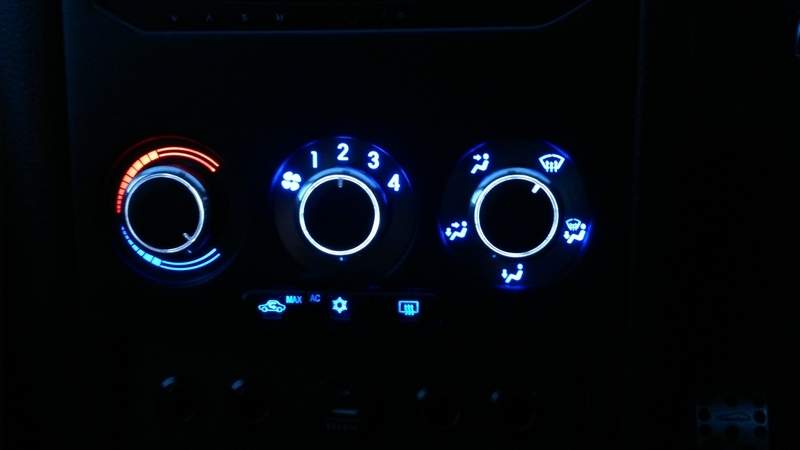
The re-cycle air and rear window demister are illuminated blue, and the air con is white. The colour looks spot-on in real life and the camera really doesn't do it justice.

The build...
The fly leads are to provide power to the SMDs in the re-cycle air, air con and rear window demister buttons. Notice I've cut the light guide to clear space
.
The LMF Stainless Steel with Electric Blue backing (thanking astra_dave massively here - thanks mate
)
In the car...


Another sneek preview of another project too... (it's still in progress though - more soon).

Night Illumination pics...


The re-cycle air and rear window demister are illuminated blue, and the air con is white. The colour looks spot-on in real life and the camera really doesn't do it justice
.

MiTcH_SRI2.2
Regular Member
Very nice touch with the heater dials got me thinking of doing this to mine
got me thinking of doing this to mine
Dave One
Regular Member
Very nice touch with the heater dials
Thanks
. Happy to link parts or answer any questions but suspect you'll be able to manage it anyway .
Dave One
Regular Member
very good
looks much easier than modeling the Climate control panel lol
Yeh, I've gone for the easy option
.....
Dave One
Regular Member
Vectra B Roof Cubby fitted
I've had the Vec B Roof Cubby for about 2 years now, bought for the bargain price of £2.20 plus £4.41 for postage - a total of £6.61. The delay for putting it in was because I had nothing to go in it, and it needed to fucntional to be worth the effort. I have decided on what to include but initial testing has left me in two minds on how to progress but one thing is for sure, the roof cubby is staying..............
First a template was offered up and taped in place...

Next the incisions were made...

Next a gapping hole... I took the opportunity to reroute, tidy, solder and heatshrink the loom properly after the photo was taken.

Fitted...
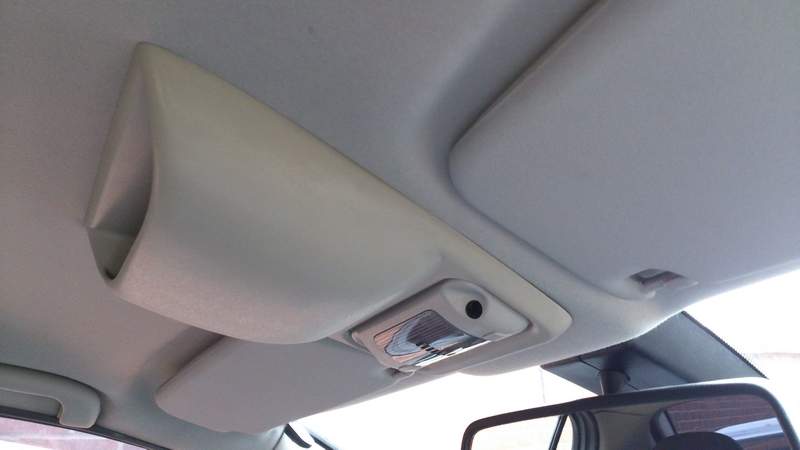
I will update on what's inside when I figure out the best way forward!
I've had the Vec B Roof Cubby for about 2 years now, bought for the bargain price of £2.20 plus £4.41 for postage - a total of £6.61
. The delay for putting it in was because I had nothing to go in it, and it needed to fucntional to be worth the effort. I have decided on what to include but initial testing has left me in two minds on how to progress but one thing is for sure, the roof cubby is staying..............First a template was offered up and taped in place...

Next the incisions were made...

Next a gapping hole... I took the opportunity to reroute, tidy, solder and heatshrink the loom properly after the photo was taken
.
Fitted...

I will update on what's inside when I figure out the best way forward!
Dave One
Regular Member
Nice! Can't say I've seen that fitted to an Astra before.
Cheers Matt. I can't take credit though as there are a few knocking about
.
Dave One
Regular Member
Flip Key Repair and Blue LED Conversion
I managed to sheer the hinge on my Flip Key so bought a new one just to replace the hinge (so if anyone has a spare hinge I would gratefully buy it of you to have a spare flip key). Whilst it was all stripped down I replaced the battery and done the blue LED conversion too, well why not eh? .
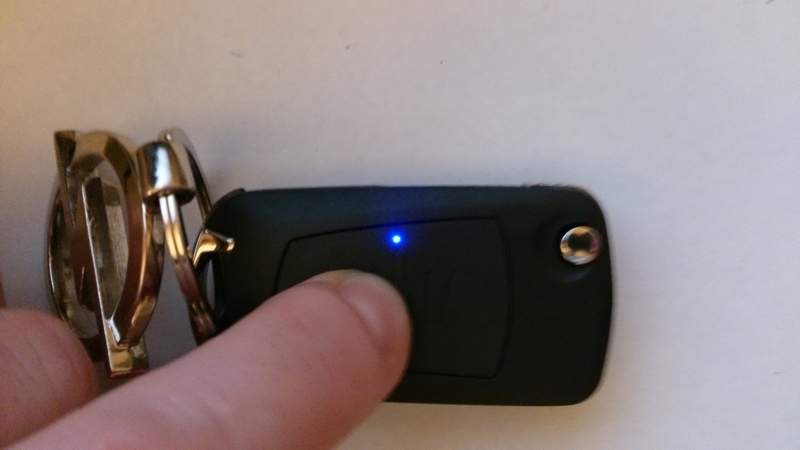
I managed to sheer the hinge on my Flip Key so bought a new one just to replace the hinge (so if anyone has a spare hinge I would gratefully buy it of you to have a spare flip key
). Whilst it was all stripped down I replaced the battery and done the blue LED conversion too, well why not eh? .
Dave One
Regular Member
Car PC USB port
To make things easier for updating the Car PC I decided to adapt some parts to have a dash mount USB port (this was done a couple of months ago and awaiting dash improvements).
I ordered a Belkin USB car charger and used a USB that was knocking around...

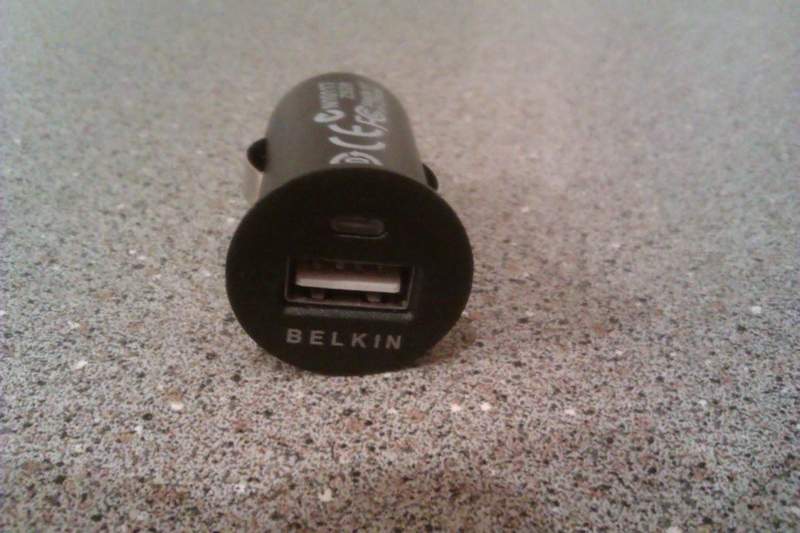
Stripped down the Belkin USB car charger in order to convert from charging 5v only to charging and data transfer...

The USB cable was chopped and added soldered to the Belkin USB car charger connector, so as to be able to mount it back into the Belkin facia...

Blue LED added to illuminate when the PC is on (surprisely useful for port location in the dark...)...
The finished article...


To make things easier for updating the Car PC I decided to adapt some parts to have a dash mount USB port (this was done a couple of months ago and awaiting dash improvements).
I ordered a Belkin USB car charger and used a USB that was knocking around...


Stripped down the Belkin USB car charger in order to convert from charging 5v only to charging and data transfer...

The USB cable was chopped and added soldered to the Belkin USB car charger connector, so as to be able to mount it back into the Belkin facia...

Blue LED added to illuminate when the PC is on
(surprisely useful for port location in the dark...)...The finished article
...


Matt
Administrator
That looks spot on!
Dave One
Regular Member
Vectra B Cubby Gadget
I'm still not 100% convinced but I'll stick with it for now...... I will use some trim edging to tidy the hole cut. Visibility is poor from the driving position as it sits slightly further back than I had planned but the audible alarm feature works ok.
Another option is something linked to or driven by the PC, but this fills the hole for now.
Day...


Night...


I'm still not 100% convinced but I'll stick with it for now...... I will use some trim edging to tidy the hole cut. Visibility is poor from the driving position as it sits slightly further back than I had planned but the audible alarm feature works ok.
Another option is something linked to or driven by the PC, but this fills the hole for now.
Day...


Night...


Dave One
Regular Member
Switch Identifiers
I've used Liam (Briggz) for my stickers and gel badges, of which I have always been impressed with, and this batch was no execption. I asked for gel domed bagdes in the same font, colour and style of my ashtray 'Dave One' logo, and he delivered to spec.
The badges are for the recently added dash switches and are:
Enough explanation, its pic time.
Liam (Briggz) very kindly provided two sets as I'm off to my first AstraOwnersClub (AOC) meet tomorrow and want the dash to look complete, Cheers Liam.

A masking tape baseline and tweezers were used to line the little 12mm x 8mm stickers up...

In the car...


I've used Liam (Briggz) for my stickers and gel badges, of which I have always been impressed with, and this batch was no execption. I asked for gel domed bagdes in the same font, colour and style of my ashtray 'Dave One' logo, and he delivered to spec
.The badges are for the recently added dash switches and are:
- PRK for Parking Sensors (to be added soon)
- RLD for Radar Laser Detector (the Snooper S6-R Neo recently added)
- USB for erm, USB port
- AMP for Amplifier(s) (I'll be adding a separate Sub Amp soon but this will control both)
- OBD for On-Board Diagnostics (to turn my PC PSU controlled power line to the ElmScan 5 OBD Reader)
Enough explanation, its pic time
.Liam (Briggz) very kindly provided two sets as I'm off to my first AstraOwnersClub (AOC) meet tomorrow and want the dash to look complete, Cheers Liam
.
A masking tape baseline and tweezers were used to line the little 12mm x 8mm stickers up...

In the car...


Dave One
Regular Member
Arduino Uno Input Board
I produced the code (with some help from a fellow Car PCer called Trev - thanks mate) for the Arduino Uno Rev 3 to be able to monitor multiple analogue inputs, namely the steering wheel control buttons (6 of but doubled to 12 due to monitoring for a greater than 1 second hold) and both heated seat switches converted specifically for this application (details on switch conversion to follow).
The Arduino essentially measures the analogue inputs to detect change. When the analogue value is at a predetermined value, which has a allowable tolerance level or variance, a keyboard value is produced to simulate a keypress. The Car PC front end software is manipulated to associate a function to the keypress and can be set globally (throughout every screen/mode) or locally within that particular screen. This means the 'next track' button can be 'next track' in GPS and Audio Player screen/mode, or 'scroll down' in Audio Browser mode.
Pic time. The Arduino Board in a lovely electric blue layer case . Note the connections, one USB to communicate with the Car PC and a three analogue inputs which is A0 (Steering Wheel Button) and A1/A2 (heated seat switches).

Stowed in the glovebox next to the USB Hub.

The heated seat switches used for control.

The offside heated seat switchsettings are as follows:
0 - No action
1 - GPS
2 - Audio Player
3 - Audio Library
4 - OBD live data feed
5 - File Synchronisation (currently only set up for USB drive but could be over wifi)
The nearside heated seat switch settings are as follows:
0 - No action
1 - Main Menu
2 - Entertainment Mode
3 - Tools Mode
4 - Settings Mode
5 - Power Mode
The steering wheel buttons are as follows:

I will produce a short video to demonstrate the buttons in action.
I produced the code (with some help from a fellow Car PCer called Trev - thanks mate
) for the Arduino Uno Rev 3 to be able to monitor multiple analogue inputs, namely the steering wheel control buttons (6 of but doubled to 12 due to monitoring for a greater than 1 second hold) and both heated seat switches converted specifically for this application (details on switch conversion to follow).The Arduino essentially measures the analogue inputs to detect change. When the analogue value is at a predetermined value, which has a allowable tolerance level or variance, a keyboard value is produced to simulate a keypress. The Car PC front end software is manipulated to associate a function to the keypress and can be set globally (throughout every screen/mode) or locally within that particular screen. This means the 'next track' button can be 'next track' in GPS and Audio Player screen/mode, or 'scroll down' in Audio Browser mode.
Pic time
. The Arduino Board in a lovely electric blue layer case . Note the connections, one USB to communicate with the Car PC and a three analogue inputs which is A0 (Steering Wheel Button) and A1/A2 (heated seat switches).
Stowed in the glovebox next to the USB Hub.

The heated seat switches used for control.

The offside heated seat switchsettings are as follows:
0 - No action
1 - GPS
2 - Audio Player
3 - Audio Library
4 - OBD live data feed
5 - File Synchronisation (currently only set up for USB drive but could be over wifi)
The nearside heated seat switch settings are as follows:
0 - No action
1 - Main Menu
2 - Entertainment Mode
3 - Tools Mode
4 - Settings Mode
5 - Power Mode
The steering wheel buttons are as follows:

I will produce a short video to demonstrate the buttons in action
.Attachments

Similar threads

- Replies
- 0
- Views
- 1K

- Replies
- 2
- Views
- 3K